MintLite Part I

MintLite – The Luxeon Powered Mint Tin Flashlight!

This idea has been rattling around in my head for more than a month now, and I finally have thought it out enough to do some doodling in Eagle. The basic idea is built around a six watt Luxeon K2. I plan to use a pair of 2.5aH lithium batteries to provide approximately eighteen watt-hours of power. The Luxeon will be controlled by a microcontroller, providing different brightness levels, as well as protecting the luxeon from excessive current when the batteries are fully charged. The microcontroller will also monitor the battery voltage; dimming the light as needed and eventually shutting down completely to prevent over-discharge. The light will contain it’s own battery charger, powered by USB using the MAX1811. The MAX1811 will charge a single lithium cell (or cells in parallel) at up to 500mA off a self-powered USB port. The 1811 allows charging from a bus-powered port as well, but for sake of simplicity, I will ignore that option.

mintlite schematic diagram luxeon max1811 pic microcontroller

The circuit keeps things fairly simple. Switch Q1 provides pwm control of the luxeon. Header SW1 will connect to some sort of switch, for turning the light on and off, and changing brightness. The MAX1811, IC2, takes 4.3 to 6.5 volts as input, and regulates it to 4.2 volts for charging the lithium cells. Charging status is indicated by LED2, which will light when the charger is in bulk charging mode (current mode).The microcontroller, IC1, is a PIC12F683. The 683 provides a lot of bells and whistles for such a small chip. I will be using analog input 0 to monitor the battery voltage. General purpose input 2 will monitor the charging status, perhaps to disable charging when the batteries are in bulk charging mode. General purpose input 4 will use an internal pull-up resistor to monitor the switch. General purpose output 5 is controlling a mosfet transistor responsible for PWM of the led.

The pcb layout is in it’s early stages, and designed mainly around parts I have on hand. I don’t think I’ll actually prototype this PCB, since it’s much too large, and the wrong shape. Whether it gets printed or not, it was fun to draw. There are two main things I want to change. First the FET (Q1) in the TO252 package is rated at something like sixty amps – way more than I need for this project. ON Semiconductor has some nice SOT23 fets rated at 4 amps that should fit the bill nicely, and save a lot of space. Secondly, I need to find a smt version of the usb connector, perhaps a mini usb instead.

Hopefully this weekend I’ll be able to breadboard this circuit and see how it all goes together. Stay tuned for “Part II”.
A few ideas, but still too hot.

I’ve been rolling a few idears around in the brain box, in preperation for re-opening the lab, since the summer heat is on its way out.

Number 1: Eclipse mints based usb charger / battery. I like the esclipse tin better than altoids gum, since its more square and only has a small opening via a hinged lid at one end. It should hold two lithium ion cells and a small PCB quite nicely. My plan is to make the gizmo with a small switch (or automatic possibly), so it can both charge/operate USB devices. or recharge off a USB host.

Number 2: Ice breakers mints based palm light / flashlight. Take a metal ice breakers mint tin, slap in some lithium cells, a USB re-charging circuit, add a 6 watt luxeon K2 and presto… nice and bright palm-sized flashlight. I also thought about adding a USB capabile microcontroller, and having the device show up as an HID gizmo in windows … perhaps allow programming of different brightness levels, check battery, etc.

Number 3: USB controlled Luxeon 1 based keyboard light. Using some semi rigid tubing of some sorts, and a not-yet-found small metal enclosure, create a usb HID based keyboard light for using on my laptop.

Thats all I got for now – till next time!

TPS61040 Constant Current Driver

I’m already up past my bedtime, so just a few pictures for now. Write-up coming soon!

Specs: Input 2v to 6v DC … Output constant current 50mA up to 28v DC
Efficiency: Initial measurements, somewhere around 75%
Chip Texas Instruments TPS61040

tps61040 boost converter constant current led driver
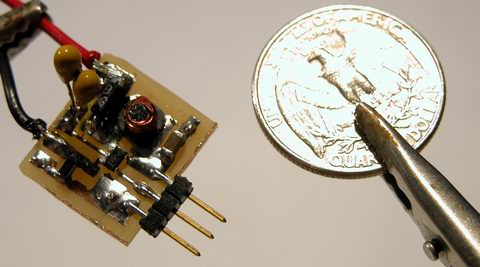
size comparison, american quarter dollar piece


circuit detail – design is one-sided PCB with two through-hole jumper wires and the diode, everything else is smt


twin 1uF tantalum capacitors … the output capacitor I had originally selected was limited to 16v, so this was the best I could come up with on a Sunday. Note the top of the coil is missing – these things are fragile!

TPS61040

Most of the applications for LEDs I’ve run into require a lower than supply bias voltage for the LEDs. This situation is fairly easy to deal with, you can use a current limiting resistor, a linear regulator, or in high power applications, a step-down or buck converter.

However, occasionally, it may be beneficial to have a rather high LED bias voltage, even with a low supply voltage. For example, in small battery powered applications, rather than run your LEDs in largely parallel configurations (which has many drawbacks), you can string the LEDs together in a large series string, and then parallel those strings if need be.

Enter the TPS61040 from Texas Instruments. The TPS61040 is an integerated high efficiency step-up or boost converter. It is a integerated converter rather than a controller, because it contains both the power switch and the feedback circuitry. This means a very simple design is all that’s required to make it work – and in my opinion, the smaller the part count, the better.

tps61040 step-up boost converter smps led driver

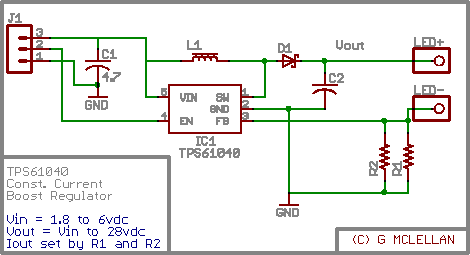
There is my schematic, which provides for a variable voltage constant current “LED Driver”. LED current is programmed by resistors R1 and R2, which are connected in parallel. Inductor L1 is a small 10uH inductor, and D1 is a ‘standard’ schottky diode. C1 and C2 are low ESR ceramic capacitors, with an X7R rated dielectric. The chip itself, IC1 is an amazingly small SOT23-5 package surface mount IC. The rest of the components are also surface mount, both for space savings and laziness, as I hate drilling holes. I was out of SMT schottky diodes at the time I drew this, so D1 is a 2.8mm by 7mm DO41-7 package. C1 can be a 10 or 16 volt cap, C2 should be rated at the output voltage plus a safety factor (for dealing with ripple). L1 should be sized to handle the current demands of the circuit – I just went with 1.6 amps since it was cheap.

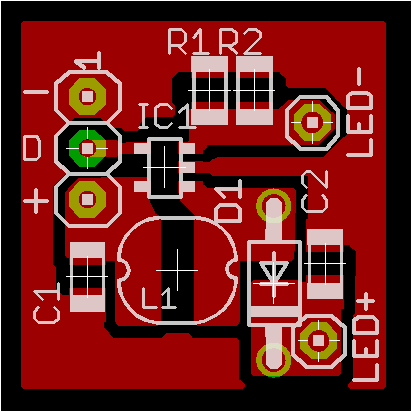
tps61040 pcb layout artwork

The layout is about 20mm square. My intended application is for lights inside a “shadowbox” style picture frame. I want a small string of white LEDs powered by some cheap AA batteries. I’m out of PCB developer right now, so no PCB fab this weekend. Once I get some more in, I’ll share the finished product with everyone, as well as some pictures of my cheezy art project.

If anyone should want full resolution layout or pcb artwork, just hit the contact justdiy button, over in the right hand sidebar.

Touch Sensing Building Blocks I

The “core” building-block I mentioned in my last post is nearing completion, at least, the software.

I have my microcontroller handling “switch emulation” tasks. It can emulate either group of momentary switches or a group of toggle switches. Response time is real good in a dimly lit room, and it works decently well even with the overhead fluorescents turned on.

Right now I’m working on a basic keypad PCB I can throw together, for a ‘proof of concept’ prototype. The first keypads will likely only support 6 keys, and I’ll build from there. Six keys requires twelve LEDs, six of them need direct and discrete anode and cathode connection to the microcontroller. The other six LEDs are providing bias light for the sensors to “see”.

I should have a video up tomorrow of the breadboard in action, and hopefully some pcb’s by next weekend.

LEDs As Sensors: Revisted

Thanks to the folks at Make: and Hack A Day, my research into the area of using LEDs as sensors has been receiving a lot of attention. With this attention comes questions. I like receiving questions. Only thing I don’t like about answering questions in the e-mail is the knowledge is locked up. Sure I could repost the e-mails, but it is sometimes difficult to follow the context after the thought train has left the station. With my rekindled interest, I wanted to take a short moment and summarize a few things.

These are just my opinions – and I welcome debate and feedback on them – I especially welcome anyone to be challenged by them enough to prove me wrong. LEDs as Sensors offer at least two avenues of usefulness; communications and interface. I haven’t dipped even a toe into the communications side of the pool – all my work has been on interface.

These are the applications I feel LED Sensors are a poor fit to replace:
#1 – The touchpad on your notebook. Seriously, no one but a geek would enjoy having 128 or more bright LEDs glowing continuously to replace the little capacitive discharge pad that is used 95% of the time today.

#2 – The keys on your keyboard. LED sensors are pretty slow, even a modest typist would be hindered by the response time.

#3 – Any application that needs to work outdoors. LEDs and the Sun do not get along.

These are the application I feel LED Sensors may work well in:
#1 – Keypads and interactive displays used for Art and Music. These applications fit the ostentatious nature of the interface, where the controls are as much a work of art as a functional device.

Yep, that is it… that is the only application I think LED Sensors offer any strength in.
Here is an example – Musician / DJ sound effects tablet:

Imagine a thin tablet like device, glowing brightly with powerful LEDs in an otherwise darkened club / dance hall / etc. The tablet accepts an ordinary 8×11 sheet of transparency film. Printed on the film are the names of pre-programmed effects / samples /whatever. Under the film, evenly spaced trios of LEDs are used to detect the presence of a reflective object. The tablet connects into the rest of your system using regular MIDI or whatever other interface one can think of. This tablet is no different than boxes hobbyists and musicians have been building or buying for years, except, the mechanical switches have been replaced with eye catching LEDs.

Here are a few other questions that have been raised:

Q: Do I have to use red LEDs?
A: No, technically any LED color works. Red is the cheapest and that is what I use. Along with yellow, red is almost the most sensitive.

Q: I tried IR LEDs and they seem very sensitive, why not use those?
A: The point of using LEDs as Sensors is to have an ostentatious interface. It’s not going to be very showy if the light is invisible. If you want to use infrared LEDs, use one emitter and one photodiode / phototransistor – it is a LOT easier.

Q: Does this work with organic / flexible LED displays?
A: I have no idea. Those displays are largely theoretical and prototypical in nature – maybe in five years when I can buy one for a few dollars, I’ll experiment with it. The organic compounds used to manufacturer these displays also have big problems with humidity and overall short lifespan – neither are very positive traits.

Q: Can you send me your ASM code for such and such?
A: No, no I can’t. I do not have any ASM code – I do not know how to program in assembler. I have code written in Proton Basic, which I will happily share.

Q: I want to get started with microcontrollers?!
A: Excellent – I’m not going to help you. There is a huge learning curve involved – a lot of it can be skipped by spending money (on proton basic). Check out www.sparkfun.com and www.crownhill.co.uk for good microcontroller stuff. Check out google.com for tons of info on learning microcontrollers.

Q: What microcontroller do you recommend?
A: I like the new PIC16F690 family from Microchip. It is a small inexpensive package that offers many features only found on larger processors (like dedicated i2c hardware). It also sports at least 10 ADC ports.

——

In closing, I would also like to share some basic info on what I’m working on at the moment. My current project is to get a stand alone system worked out for emulating mechanical switches. I consider this a valuable “core” building block behind the technology. I have momentary switches partly working, after that, a toggle switch shouldn’t be much harder. As a future goal, I would like to get “cores” built to emulate sliders and knobs. Those three elements should cover a great deal of the artistic / musical needs that I feel this technology is well suited for.

Thank you for visiting and I welcome your comments. My gmail is gordonthree – feel free to contact me about anything.

Temporary Lights

Another of my hobbies is keeping freshwater tropical fish. Ever since moving into my new house, and building my electronics lab upstairs, I haven’t been too interested in the fish. I give them more water when they need it, feed them on occassion, and do minimal basic maintainence.

The 55 gallon tank has gotten quite out of hand. A single variety of cryptocorne had gone on a killing spree, and had consumed the entire floor of the tank, wiping out every other plant that was in there. After it had consumed all there was to consume, fate turned the tides, and algae began to consume the crypts. So, with much disgust, I threw away all the crypts (mostly all covered with algae)… along with them went most of my substrate, entangled in the massively thick root balls of the crypts. So now my 55g sits empty – except for the fish, some huge snails, and the ugly life support equipment.

The tank normally has 108 watts of T5HO lighting (excessive for fw) , however, without any vegatative competition, algae would quickly rule the roost had I maintained normal lighting. So, I thought this would be a good application for LED lighting. The weak, sickly glow from “white” piranha leds will give me enough light to see my fish, and keep them accustomed to a day/night cycle, but not enough for algae to survive on.

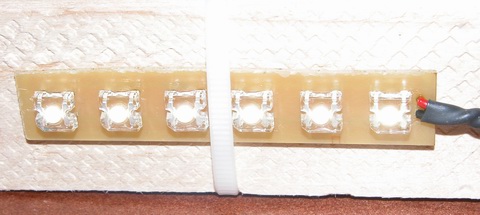
piranha superflux LED strip

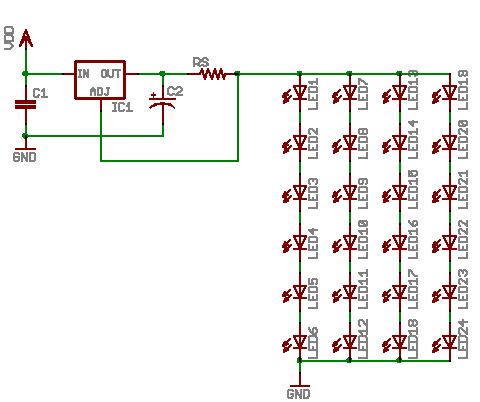
My solution involves 24 white piranha leds, with a color temp somewhere around 5000 kelvin. The 24 leds are broke up into four strips of six, those four strips wired in parallel across the power supply. The power supply is a LM317T wired up as a constant current regulator.

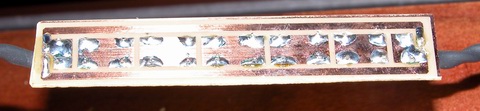
piranha superflux LED strip

The strips are designed with basic thermal management in mind. Since I am running the piranha at nearly 150mW, they generate a fair amount of heat. Therefore, I designed the strips with a maximum amount of copper possible, to act as heatsink and radiator.

pcb artwork superflux LED strip

All together, the ‘fixture’ consumes a little over 4 watts of energy. Here is the basic schematic of how things are wired up. This design is not very ‘safe’ … should an led strip fail as an open, the regulator will provide too much current to the remaining strips. The addition of a transistor and resistor to each strip would help combat this problem, by switching the current programming resistor in and out of the circuit… but this would require me to re-draw everything, make new PCBs, etc etc. This solution only needs to last a few months, once warmer weather arrives, I’ll be mail ordering some plants and have the tank restocked and the main lights working again.

superflux LED schematic diagram

LED Drivers

One of the “quests” I have been on lately, is to find an optimal solution for driving Light Emitting Diodes. I want a solution that balances three key needs; efficiency, flexibility and cost. Efficiency and cost have a direct linear relationship it seems – the more efficient something is, the more it will cost. Flexibility seems to have an inverse relationship with efficiency – the more flexible a solution is the less efficient.

For example, take these three basic “led driver” prototype circuits:
led driver prototypical schematics

Starting off, the plain ‘ol resistor. The only strength this solution has is cost. It is neither flexible nor efficient. That is not to say an optimally designed solution will not see decent efficiency using a plain resistor, the designer needs to closely match the LEDs forward voltage to that of the supply. Now as long as the supply voltage never changes and the attributes of the LEDs never change, the resistor will do its job, limiting current. However, if the designer has limited control over the supply voltage, the resistor’s efficiency is down the drain. Because a resistor is a passive component, it cannot react at all to any changes – therefore the designer needs to specify a resistor for the maximum anticipated supply voltage, which results in sub-optimal light output during periods when the supply voltage is less than maximum. Low efficiency equates to wasted power and excessive heat. In summary, the plain ‘ol resistor is the easiest ‘driver’ to build, using simple arithmetic, the value and capacity of the resistor can be calculated; R = (Vsupply – Vleds) / Ileds and P = Ileds ^ 2 * R.

Next, we have the humble linear regulator. I chose the LM317, which is widely available and very inexpensive. The strengths of linear regulation are two fold. First, linear regulation provides a wide degree of flexibility. Secondly, linear regulation provides a very low cost. Two out of three is not bad, but the last one is the kicker. Linear regulation is terribly inefficient. A linear regulator configured for constant current mode is going to consume (dissipate) almost as much power as the load it is regulating. This means a 5 watt LED load is going to have the regulator dissipating an additional 5 watts. So using linear regulation in your design, the power source must deliver 10 watts to give yeild 5 watts of power for the lights, and this is an optimistic 50% efficiency – National Semiconductor gives the LM317 something like 43% efficiency! In summary, the linear regulator is marginally more complex than using a simple resistor, and about as easy to design. A single equation gets us the value of Rs, the current sense resistor; Rs = 1.25 / I.

Next we have the compound, pre-made group of devices that I call switchmode drivers. The switchmode driver is a ‘black box’, in its simplest form, offering four leads, two inputs, two outputs. Drivers are available in two primary configurations; step up (boost topology) and step down (buck topology). Both configurations excel in efficiency. While efficiency alone is a good enough reason for some designs, such as battery powered applications, the switchmode drivers also offer a limited degree of flexibility. The negative aspect of a switchmode driver is cost. Prices for switchmode drivers start in the neighborhood of $10 and top out around $60. Flexibility in switchmode drivers is usually in the form of allowable ranges. For example, a step down driver may allow an input range Vout + 2V to 36V. That same driver may also have a range on the output, for example 3V to 28V. The biggest drawback to the switchmode driver is the lack of adjustable drive current. In general, a switchmode driver has to be purchased from the factory with a pre-programmed drive current. While this is fine for most designs, it is not optimal. In summary, the switchmode driver offers excellent efficiency, often times better than 85%, but it offers this efficiency with great cost and limited flexibility. There is no math required to design using a switchmode driver, you just have to pick one that matches your supply voltage and LED current needs.

The last driver I will briefly touch on, saving the details for next time, is the home-brew or DIY switchmode driver. In kit form, this driver satisfies all three of my design goals. Decently low cost (less than $10 in parts), high efficiency (more than 80%) and good flexibility (I control the programming). Of course, there are some drawbacks; some of the parts are hard to find, there is a LOT of math involved and due to high frequencies and currents, careful circuit layout needs to be observed.

Another technology I will mention, but have not researched much (it is truly bleeding edge in the industry) is something called SEPIC. The acronym stands for Single Ended Primary Inductor Converter. It is a technology pioneered by Maxim and combines the abilities of both a step up and step down regulator into a single design. The ‘old fashioned’ buck-boost regulator of yesteryear do their voodoo by internally generating very high voltages, and using the positive rail as a low side reference for the load … that design has some very hard limits and is also rather inefficient. SEPIC hopes to solve these problems with a radically different and more complex design. SEPIC offers a power supply that with ultimate in flexibility – there need be no correlation between input voltage and output voltage. Want to run 15 volts of LEDs off a 3.7 volt lithium battery, no problem. Want to run 11 volts of LEDs off an automotive supply that varies between 11 and 15 volts, no problem.

I have more to write on this subject – my next post on this subject will sum up my experience in designing switchmode power supplies and share some designs the reader may find useful.

Matrices as Sensors

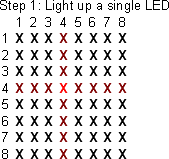
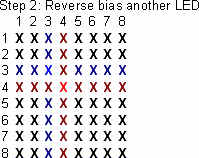
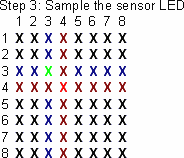
This idea was shared with me on the electro-tech-online forums, and I made up some graphics to help myself and others understand it.

step one
The first step involves choosing your illuminator LED – this diode will provide light for nearby sensors to ‘see’.

step two
The second step is to reverse bias a nearby LED, preparing it to be the sensor. A diode in an adjacent row and column must be selected, to avoid electrical interference from the illuminator.

step three
The third step is reading the voltage present on the cathode terminal of the diode, which indicates the light level the sensor detected.

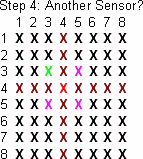
step four
The controller can then choose another nearby diode to use as a sensor, or move on to another pixel in the array, repeating the entire process.

Dead Bug, Revisited

My previous dead bug attempts were just that, dead bugs … although the mounting method was successfull, it was really difficult to get the chip to stay put – the heat from soldering the connections melted the glue and the thing was sliding around.

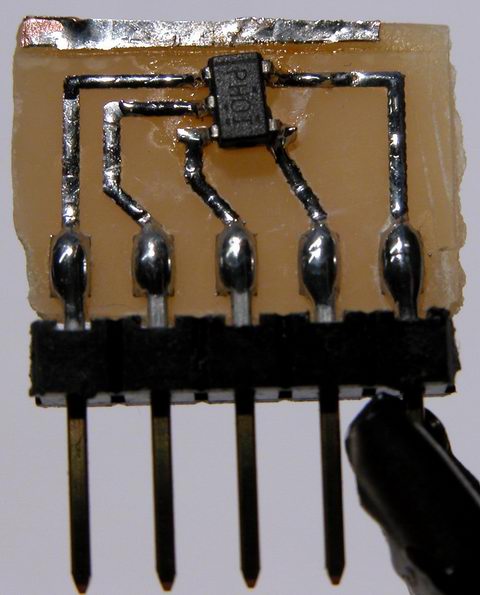
So, I made up some PCB layouts for an SOT adapter, allowing me to solder the chip properly, and still provide something I can use easily in a breadboard. This is what I came up with:

tps61040 dc-dc converter switch mode power supply boost step-up

Not the cleanest example of my work, I admit to the fact it looks pretty awful. But it does work well. It is just a simple SOT-23-5 transistor pad layout, expanded to 0.100″ pitch pads. To the big pads, I solder the short side of a molex C-Grid pin header, and then solder the IC to its pads. The C-Grid pins plug perfectly into a breadboard. The whole thing is about the size of a nickel.

Ok, so now that I have the IC in a managable package, what does it do? The IC is a Texas Instruments TPS61040 step-up dc-dc converter. You feed it a low voltage (3 to 6v), and it produces a high voltage (3 to 28v). The IC contains almost all the parts of a switch mode power supply, including the switch itself.

switch mode power supply texas instruments tps61040

Add a hand wound inductor, a few caps and a schottky diode, and I have a complete SMPS. The 040 offers a few neat features, including analog and digital dimming support, automatic softstart to limit inrush current, open load detection, and very very low standby / no load currents. For my experiments, I decided to power eight white piranha LEDs at 50mA (the 040 can handle up to 400mA). My power source was two 1.5 volt alkaline batteries, connected in series.

I was able to run the leds for a few hours until my super cheap “Shazam” brand batteries gave out. I’m sure with a proper set of four NiMH batteries, the LEDs would run for a long time.

My next experiment will be to run a string of power leds using this converter… say four 2 watt jupiters (well, at 400mA, I won’t achieve quite 2 watts). I need to get a proper inductor and a larger output capacitor, to handle the much increased load.