Shameless self promotion

Sorry if I interrupted anyone’s reading … don’t you like my shoot from the hip method of working on live site code, instead of some backup / test site?

I have added a link to the end of each posting, allowing readers to easily bookmark posts they would like to share with the del.icio.us community.

LEDs As Sensors: Revisted

Thanks to the folks at Make: and Hack A Day, my research into the area of using LEDs as sensors has been receiving a lot of attention. With this attention comes questions. I like receiving questions. Only thing I don’t like about answering questions in the e-mail is the knowledge is locked up. Sure I could repost the e-mails, but it is sometimes difficult to follow the context after the thought train has left the station. With my rekindled interest, I wanted to take a short moment and summarize a few things.

These are just my opinions – and I welcome debate and feedback on them – I especially welcome anyone to be challenged by them enough to prove me wrong. LEDs as Sensors offer at least two avenues of usefulness; communications and interface. I haven’t dipped even a toe into the communications side of the pool – all my work has been on interface.

These are the applications I feel LED Sensors are a poor fit to replace:
#1 – The touchpad on your notebook. Seriously, no one but a geek would enjoy having 128 or more bright LEDs glowing continuously to replace the little capacitive discharge pad that is used 95% of the time today.

#2 – The keys on your keyboard. LED sensors are pretty slow, even a modest typist would be hindered by the response time.

#3 – Any application that needs to work outdoors. LEDs and the Sun do not get along.

These are the application I feel LED Sensors may work well in:
#1 – Keypads and interactive displays used for Art and Music. These applications fit the ostentatious nature of the interface, where the controls are as much a work of art as a functional device.

Yep, that is it… that is the only application I think LED Sensors offer any strength in.
Here is an example – Musician / DJ sound effects tablet:

Imagine a thin tablet like device, glowing brightly with powerful LEDs in an otherwise darkened club / dance hall / etc. The tablet accepts an ordinary 8×11 sheet of transparency film. Printed on the film are the names of pre-programmed effects / samples /whatever. Under the film, evenly spaced trios of LEDs are used to detect the presence of a reflective object. The tablet connects into the rest of your system using regular MIDI or whatever other interface one can think of. This tablet is no different than boxes hobbyists and musicians have been building or buying for years, except, the mechanical switches have been replaced with eye catching LEDs.

Here are a few other questions that have been raised:

Q: Do I have to use red LEDs?
A: No, technically any LED color works. Red is the cheapest and that is what I use. Along with yellow, red is almost the most sensitive.

Q: I tried IR LEDs and they seem very sensitive, why not use those?
A: The point of using LEDs as Sensors is to have an ostentatious interface. It’s not going to be very showy if the light is invisible. If you want to use infrared LEDs, use one emitter and one photodiode / phototransistor – it is a LOT easier.

Q: Does this work with organic / flexible LED displays?
A: I have no idea. Those displays are largely theoretical and prototypical in nature – maybe in five years when I can buy one for a few dollars, I’ll experiment with it. The organic compounds used to manufacturer these displays also have big problems with humidity and overall short lifespan – neither are very positive traits.

Q: Can you send me your ASM code for such and such?
A: No, no I can’t. I do not have any ASM code – I do not know how to program in assembler. I have code written in Proton Basic, which I will happily share.

Q: I want to get started with microcontrollers?!
A: Excellent – I’m not going to help you. There is a huge learning curve involved – a lot of it can be skipped by spending money (on proton basic). Check out www.sparkfun.com and www.crownhill.co.uk for good microcontroller stuff. Check out google.com for tons of info on learning microcontrollers.

Q: What microcontroller do you recommend?
A: I like the new PIC16F690 family from Microchip. It is a small inexpensive package that offers many features only found on larger processors (like dedicated i2c hardware). It also sports at least 10 ADC ports.

——

In closing, I would also like to share some basic info on what I’m working on at the moment. My current project is to get a stand alone system worked out for emulating mechanical switches. I consider this a valuable “core” building block behind the technology. I have momentary switches partly working, after that, a toggle switch shouldn’t be much harder. As a future goal, I would like to get “cores” built to emulate sliders and knobs. Those three elements should cover a great deal of the artistic / musical needs that I feel this technology is well suited for.

Thank you for visiting and I welcome your comments. My gmail is gordonthree – feel free to contact me about anything.
Water Filter Controller

The old adage “measure twice, cut once” has a realitve in the field of electronics engineering; “measure twice, design once” … ok, well maybe that’s a bit corny but anyway.

Turns out the controller I designed for my water filter is pretty much useles. My filter’s pump is not the 12vdc that I imagined it to be, instead, it is 24vac. So the two smt mosfets which I soldered to my pcb with generous amounts of solder, are not capable of switching AC. Worse, I had planned to power the controller itself off the psu for the pump, so the 7805 vreg I’m using will not appericate AC on its input terminals either.

I plan to salvage this situation however… using relays, either mechanical or electronic, as well as a separate power supply. So, I will use a ~12 volt unregulated supply to power a pair of mechanical relays, one for the pump, one for the valve, which in turn will be switched by the mosfets. Or, I can desolder / destroy / jumper over the mosfets, and run a +5v control signal to my outputs, for control of a solid state relay.

I need to price out the cost of mechanical vs solid state …. probably solid state will win, I think I can build a triac based ssr for under $2.

Temporary Lights

Another of my hobbies is keeping freshwater tropical fish. Ever since moving into my new house, and building my electronics lab upstairs, I haven’t been too interested in the fish. I give them more water when they need it, feed them on occassion, and do minimal basic maintainence.

The 55 gallon tank has gotten quite out of hand. A single variety of cryptocorne had gone on a killing spree, and had consumed the entire floor of the tank, wiping out every other plant that was in there. After it had consumed all there was to consume, fate turned the tides, and algae began to consume the crypts. So, with much disgust, I threw away all the crypts (mostly all covered with algae)… along with them went most of my substrate, entangled in the massively thick root balls of the crypts. So now my 55g sits empty – except for the fish, some huge snails, and the ugly life support equipment.

The tank normally has 108 watts of T5HO lighting (excessive for fw) , however, without any vegatative competition, algae would quickly rule the roost had I maintained normal lighting. So, I thought this would be a good application for LED lighting. The weak, sickly glow from “white” piranha leds will give me enough light to see my fish, and keep them accustomed to a day/night cycle, but not enough for algae to survive on.

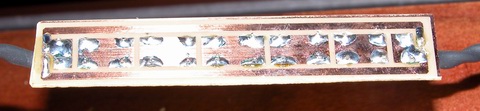
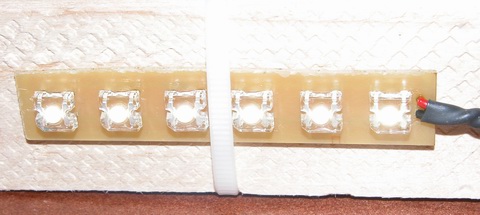
piranha superflux LED strip

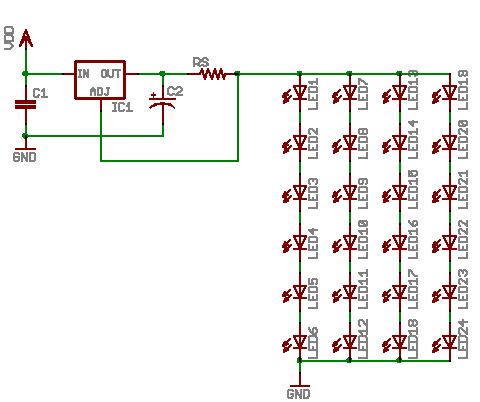
My solution involves 24 white piranha leds, with a color temp somewhere around 5000 kelvin. The 24 leds are broke up into four strips of six, those four strips wired in parallel across the power supply. The power supply is a LM317T wired up as a constant current regulator.

piranha superflux LED strip

The strips are designed with basic thermal management in mind. Since I am running the piranha at nearly 150mW, they generate a fair amount of heat. Therefore, I designed the strips with a maximum amount of copper possible, to act as heatsink and radiator.

pcb artwork superflux LED strip

All together, the ‘fixture’ consumes a little over 4 watts of energy. Here is the basic schematic of how things are wired up. This design is not very ‘safe’ … should an led strip fail as an open, the regulator will provide too much current to the remaining strips. The addition of a transistor and resistor to each strip would help combat this problem, by switching the current programming resistor in and out of the circuit… but this would require me to re-draw everything, make new PCBs, etc etc. This solution only needs to last a few months, once warmer weather arrives, I’ll be mail ordering some plants and have the tank restocked and the main lights working again.

superflux LED schematic diagram

Organization Overload

The sidebar has been on quite a growing streak lately – first a bunch of new statistic driven links, and now many many new categories.

Since my post count is getting pretty big, I decided now would be a good time to organize it, rather than wait for it to get even larger. So I have gone back through every post, and further classified them into different categories.

It should make it easier to find things now, instead of it being all lumped under “Project”.

New Stats Tracking

I have added some new plugins for wordpress that lets me get a better idea of which posts are popular and which have never been read at all.

Readers, you will notice on the sidebar, there is now a “Most Popular” section. It will list out the overall most popular when viewing the main page or viewing individual posts / pages. If you go into the monthly or category archives, it will list out the most popular posts for that month or category.

Each post also has a popularity readout at the end of the post… this is probably going away, once I find where that little bit of code was added.

I have also added a plugin that lets me track referrers, links, enter pages, exit pages, etc. I don’t think the readers can see any of the stats it produces. I may make a stats page for everyone once I get to understand these plugins a bit better.

For post popularity I am using Alex King’s Popularity Contest
For the general http stats I am using Anders Holte Nielsen’s Counterize

LED Drivers

One of the “quests” I have been on lately, is to find an optimal solution for driving Light Emitting Diodes. I want a solution that balances three key needs; efficiency, flexibility and cost. Efficiency and cost have a direct linear relationship it seems – the more efficient something is, the more it will cost. Flexibility seems to have an inverse relationship with efficiency – the more flexible a solution is the less efficient.

For example, take these three basic “led driver” prototype circuits:
led driver prototypical schematics

Starting off, the plain ‘ol resistor. The only strength this solution has is cost. It is neither flexible nor efficient. That is not to say an optimally designed solution will not see decent efficiency using a plain resistor, the designer needs to closely match the LEDs forward voltage to that of the supply. Now as long as the supply voltage never changes and the attributes of the LEDs never change, the resistor will do its job, limiting current. However, if the designer has limited control over the supply voltage, the resistor’s efficiency is down the drain. Because a resistor is a passive component, it cannot react at all to any changes – therefore the designer needs to specify a resistor for the maximum anticipated supply voltage, which results in sub-optimal light output during periods when the supply voltage is less than maximum. Low efficiency equates to wasted power and excessive heat. In summary, the plain ‘ol resistor is the easiest ‘driver’ to build, using simple arithmetic, the value and capacity of the resistor can be calculated; R = (Vsupply – Vleds) / Ileds and P = Ileds ^ 2 * R.

Next, we have the humble linear regulator. I chose the LM317, which is widely available and very inexpensive. The strengths of linear regulation are two fold. First, linear regulation provides a wide degree of flexibility. Secondly, linear regulation provides a very low cost. Two out of three is not bad, but the last one is the kicker. Linear regulation is terribly inefficient. A linear regulator configured for constant current mode is going to consume (dissipate) almost as much power as the load it is regulating. This means a 5 watt LED load is going to have the regulator dissipating an additional 5 watts. So using linear regulation in your design, the power source must deliver 10 watts to give yeild 5 watts of power for the lights, and this is an optimistic 50% efficiency – National Semiconductor gives the LM317 something like 43% efficiency! In summary, the linear regulator is marginally more complex than using a simple resistor, and about as easy to design. A single equation gets us the value of Rs, the current sense resistor; Rs = 1.25 / I.

Next we have the compound, pre-made group of devices that I call switchmode drivers. The switchmode driver is a ‘black box’, in its simplest form, offering four leads, two inputs, two outputs. Drivers are available in two primary configurations; step up (boost topology) and step down (buck topology). Both configurations excel in efficiency. While efficiency alone is a good enough reason for some designs, such as battery powered applications, the switchmode drivers also offer a limited degree of flexibility. The negative aspect of a switchmode driver is cost. Prices for switchmode drivers start in the neighborhood of $10 and top out around $60. Flexibility in switchmode drivers is usually in the form of allowable ranges. For example, a step down driver may allow an input range Vout + 2V to 36V. That same driver may also have a range on the output, for example 3V to 28V. The biggest drawback to the switchmode driver is the lack of adjustable drive current. In general, a switchmode driver has to be purchased from the factory with a pre-programmed drive current. While this is fine for most designs, it is not optimal. In summary, the switchmode driver offers excellent efficiency, often times better than 85%, but it offers this efficiency with great cost and limited flexibility. There is no math required to design using a switchmode driver, you just have to pick one that matches your supply voltage and LED current needs.

The last driver I will briefly touch on, saving the details for next time, is the home-brew or DIY switchmode driver. In kit form, this driver satisfies all three of my design goals. Decently low cost (less than $10 in parts), high efficiency (more than 80%) and good flexibility (I control the programming). Of course, there are some drawbacks; some of the parts are hard to find, there is a LOT of math involved and due to high frequencies and currents, careful circuit layout needs to be observed.

Another technology I will mention, but have not researched much (it is truly bleeding edge in the industry) is something called SEPIC. The acronym stands for Single Ended Primary Inductor Converter. It is a technology pioneered by Maxim and combines the abilities of both a step up and step down regulator into a single design. The ‘old fashioned’ buck-boost regulator of yesteryear do their voodoo by internally generating very high voltages, and using the positive rail as a low side reference for the load … that design has some very hard limits and is also rather inefficient. SEPIC hopes to solve these problems with a radically different and more complex design. SEPIC offers a power supply that with ultimate in flexibility – there need be no correlation between input voltage and output voltage. Want to run 15 volts of LEDs off a 3.7 volt lithium battery, no problem. Want to run 11 volts of LEDs off an automotive supply that varies between 11 and 15 volts, no problem.

I have more to write on this subject – my next post on this subject will sum up my experience in designing switchmode power supplies and share some designs the reader may find useful.

Water Filter Controller

As a fan of taking my dihydrogen monoxide in straight, uncut, uncorrupted liquid form, I purchased a six stage reverse osmosis filter some years ago.

My filter is a few years old now, and the super calcium enriched water we have in Michigan has taken its toll. The filter used to shut off when the production tank was full. However, the filter has recently developed a leak in the auto shutoff valve, so it’s constantly consuming water, even if the pressure tank can’t hold any more. This leak started slow, and I could live with it. In a few months, it had sped up to wasting a considerable amount of water. So, rather than replace the auto shutoff valve, which would have been too easy, I decided to add a microcontroller instead. The other problem my filter has, I discharge the brine water out to storage tanks next to my house, which hold the waste water, for watering plants and other uses. Problem is, when the temperature gets too low, the discharge line can freeze, which is very bad for the filter. So my microcontroller solves this problem as well.

The mcu is performing a few simple logic operations, with a few twists. First, it checks to see if the pressure tank reads “high” or “low”, via a pressure sensitive switch. If the tank reads “low”, that is the first “1” in my logic comparison – a simple AND operation. Second, the mcu checks to see if the outdoor ambient is above 38°F. That is my second “1” in the AND operation. If the pressure is low and the temp is good, a flag is set to enable the boost pump and water supply valve. A timer detects this flag and begins a countdown of 30 seconds (roughly). I chose to use a timer to buffer any false readings that may occur for whatever reason. After the 30 seconds has elapsed, the mcu turns on two mosfet switches, controlling the current for a solenoid valve and the boost pump. The mcu continues to monitor the two variables of the AND operation, if either changes, the “make water” flag is cleared, and the mcu turns off the water supply valve and the boost pump.

schematic diagram of water filter controller
(click for super-sized version)

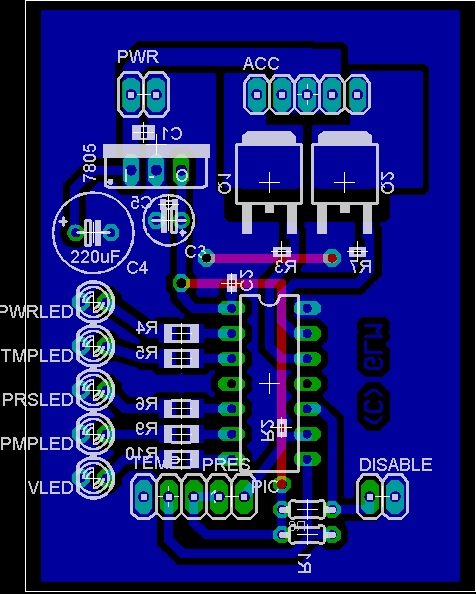
Two N-Channel mosfets control the current for the boost pump and the solenoid valve. The valve is a 24VAC lawn sprinkler valve, but I have tested it and it works well on 12vdc. The boost pump is a 100 gpd, 100 psi diaphragm pump, which delivers slow but steady high pressure water for optimal membrane operation. Pull-down resistors R3 and R7 are provided to prevent mosfet self-destruction should something happen to the microcontroller. The connectors TEMP, PRES and DISABLE are pin headers for connecting to external transducers. For reading temperatures, I chose the Dallas DS18B20 high precision digital thermometer with 1-Wire interface. The pressure switch is a simple normally closed pressure sensitive switch that opens around 45 psi. It is wired to present the PIC with a logical “1” when the pressure is low. The disable connector will be connected to a shut-off switch, allowing me to temporarily halt production. The LEDs are just for indication of various operational conditions and modes. A 7805 regulator provides the pic with 5v from the 12v supply for the pump and valve.

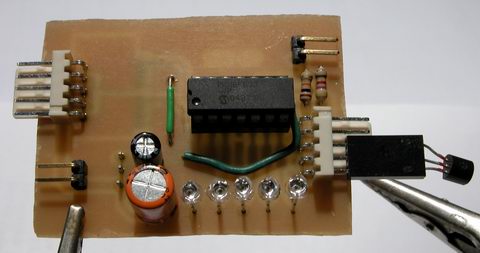
water filter controller assembled top view

Rather than cobble this together on protoboard, I made up some PCBs real quick. Here is a top view of the controller, without any connections, except for the thermometer. When installed, the thermometer will be installed at the end of a ~10ft shielded cable, for sensing the ambient temperature near my water storage tanks.

water filter controller assembled bottom view

Here is the messy solder side of my controller. I haven’t hosed it down with alcohol yet to clean off the flux. I waited till it was good and late before soldering anything, so some of those joints are pretty nasty – I apologize.

water filter controller pcb layout
(click to download full res)

The PCB layout was pretty easy – I had a lot of room to work with, as the enclosure I have selected is pretty big. This image shows the parts layout, along with the bottom copper artwork. The top layer artwork (in red) is for two jumper wires. Clicking on the above layout will get you a 300 DPI monochrome TIFF of the bottom layer artwork. Print this out at 300DPI and you should have a 1:1 scale of the pcb, incase anyone wants to make their own. Hit the contact justDIY link on the side menu if you want the firmware source code – it is written in Proton Plus basic.

Hello Readers

Greetings to Hack A Day and Delicious users.

Thanks for stopping by!

You may have noticed, I haven’t written anything in a while. Well, I’ve got the regular laundry list of excuses, work etc… but in all honesty, I haven’t been doing much with projects lately. I have been reading a LOT about switchmode power supplies, trying to come up with a ‘universal’ or at least flexible high-power LED driver.

I’ve requested a lot of samples from some big name semiconductor suppliers – latest to arrive is some cutting edge high frequency stuff from Linear.

I also recently finished a ‘utility project’, a controller for my water filter – I’ll post about that in a few hours.

Matrices as Sensors

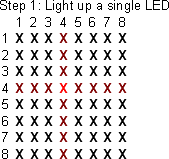
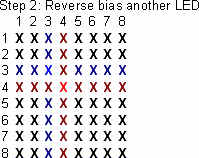
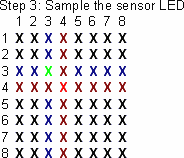
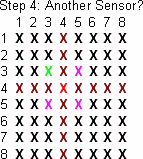
This idea was shared with me on the electro-tech-online forums, and I made up some graphics to help myself and others understand it.

step one
The first step involves choosing your illuminator LED – this diode will provide light for nearby sensors to ‘see’.

step two
The second step is to reverse bias a nearby LED, preparing it to be the sensor. A diode in an adjacent row and column must be selected, to avoid electrical interference from the illuminator.

step three
The third step is reading the voltage present on the cathode terminal of the diode, which indicates the light level the sensor detected.

step four
The controller can then choose another nearby diode to use as a sensor, or move on to another pixel in the array, repeating the entire process.