Austin Trip

My train tickets are confirmed and on their way. Finding a ride and a room in the area are proving to be more of a challenge then getting the transport. Amtrak is fairly simple compared to the airlines – there is only one train that goes there and it only has one schedule; take it or leave it!

From my research, the trains are on their schedule down to the minute – so when Amtrak says I arrive at 7pm, that’s when the train pulls into the station. I don’t know how long it’ll take to unload, or to claim my baggage. Right now I’m thinking I’ll take a rolling suitcase of mostly clothing, and a duffel bag with a few clothes for the train ride and most of my electronic gear. The duffel will stay with me in the roomette and the roller can get checked into the cargo area. I’m impressed at the luggage “restrictions” that Amtrak imposes – each passenger is limited to 5 bags, weighing not more than 50 pounds each. You get two carry-on bags and three pieces of checked luggage. Each piece of checked luggage is limited to 36 by 36 by 36 inches, which I think is a total of nine cubic feet, and I could take three of those! Of course the 50 pound limit kinda gets you there – any kind of crate that big would probably weight more than that.

The best deal on a rental car I’ve found is using a discount code from Amtrak with Hertz. However, the logistics of securing the ride are proving difficult. The auto rental places are all at the airport and the train station is on the other side of town. From what I can see on google, the station is very small – just a little building, a single rail platform and a small parking lot. I think I’ll end up with a cab ride to my motel for the first night, and then a cab or shuttle to the airport the next day.

I’m still on the hunt for rooms; downtown Austin is out of my ballpark, with most rooms costing $150+. I got a laugh that O’Rielly has a deal the the Austin Raddison for $147 a night using the coupon code MAKER – I guess working for a small time tech publication has its perks! The best prices seem to be in the North end of town, and the suburb Round Rock. There is a large shopping mall called the Arboretum that has a mix of high end and low end hotels around it.

Even though it’s more than a month away, I feel the need to start making a list of the things I want to take along.

Maker Faire: Austin

I really enjoy reading the Make website – it’s a great collection of all the DIY stuff that’s going on out there. And all the different events they cover look like fun. So I’m going to the Maker Faire in Austin this fall. I believe the dates are October 18th and 19th. Is anyone else going, are any of my readers from the Austin area? Shoot me a gmail @ gordonthree if you know anything about any of this! I don’t know anything about the Austin area, and the various online mapping tools aren’t offering up a lot of detail either.

The last vacation I took was way back in 2005. I made a road-trip to Florida, to watch the space shuttle’s return to service flight after the Columbia disaster. I got there, hung out with some family for a few days, no space shuttle. So I went down to the keys for a few days, shuttle still was on standby. Spent nearly two weeks, and didn’t achieve much but a decent credit card bill. The drive through the mountains was fun… The road leading from south-eastern Tennessee through North Carolina was really something – winding roads with a sheer mountain face on one side, and a sheer drop off on the other. Mix that with lots and lots of big trucks going way too fast, just enough rain to make the road greasy and twilight from a just-setting sun and you get “white knuckles” kind of fun! On the way back I got to see Corvettes being built and climbed around in the Mammoth Caves system for a few hours.

I bought a new truck this year in June – it is a gas guzzler but the price was unbeatable and with huge tires and four-wheel drive, it’ll be fun in the Northern Michigan snow. However, trying to take a road-trip vacation anywhere with it would get real expensive real fast – 18-20 mpg on the highway at $4/gallon – oh yea! That leaves mass-transit; Originally I was looking at flying from Grand Rapids – the airfare was reasonable and there it was a fairly direct flight with only one lay-over. While I was pondering my options, the price almost tripled. Lower oil prices equal higher airline fares I guess. I could drive to Detroit and fly from there, but that’ll cost a lot of gas money and parking at Metro is not cheap.

My folks suggested I look at taking the train. Originally, I had dismissed the train since it takes thirty hours to cover the roughly 1200 miles. However, after the spike in fares, and reading about the TSA’s crackdown on IEDs, I figured flying might not be the best option, especially if I wanted to take some of my projects along for show-n-tell with other makers should the opportunity arise. With the cost of a sleeperette added in, the rail cost half the cost of first class, but a few hundred more than coach. If I wanted to ride coach, it would be real cheap, but I have reservations about sleeping in “public”, which might occur sometime during the ride. Traveling “first class”, aka, private room / sleeperette, Amtrak is apparently very accommodating. They include a bunch of meals, free pop/water and a generous luggage allowace. The room apparently has 120v outlets for gadgetry, so I don’t need a suitcase of batteries to run a laptop on the journey. To make things more interesting, I’ll be taking a commuter train from Holland to Chicago. To get to Holland on time, I’m looking at a 0530 lauch time. So 30 hours on the long haul train, 3 hrs on a commuter train, 3 hr layover in Chicago between trains and a 2 hour drive to Holland equals roughly 38 hours? That’s a long day!

Anyway – I wanted to write a bit about this so I can get it out of my head – and see if anyone reading the blog knows about the area or show, or is planning on attending? My thoughts are rambling now so I’ll have to recompose things and write some more later.

Dry reading

The next few months might bring some dry reading for the visitors to my blog. The camera I do 99% of my photographic work with has died silently sometime this past week. It’s not that the camera is dead, but it might as well be, as it appears the imaging chip has failed, or the circuitry that processes the signal from the chip.

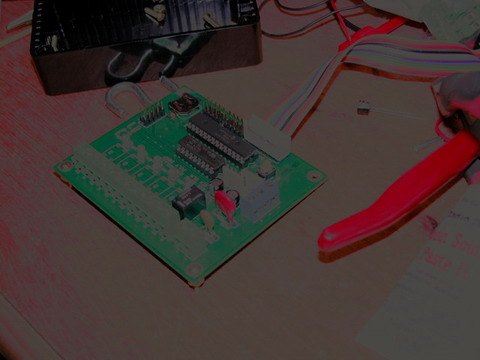
Here’s a shot of the sprinkler controller I’ve been working on.

That picture was taken in a sun lit room, with overhead lights and a work lamp on. Plus the camera’s AI fired the flash at full power.

I’ll be contacting Nikon regarding repair, but unfortunately, I’m pretty sure it’s the end of the line for this cam. With 3rd quarter taxes coming shortly, I’m not in a position to make a big purchase right now, so it might be a few months before I get a new cam.

If I get desperate enough, you might see some awful pictures from my cellphone on here!

Addendum:

The camera in question is a Nikon Coolpix 5700, which is listed as one of the models affected by the Sony ccd failure problem

Update:

Although my problem doesn’t fit the description of the current “service advisory”, Nikon is going to check it out. At best they’ll repair it for free, at worst, they’ll give me a quote on repairs. If it’s within the price range of a new ‘throwaway’ digital, I’ll get it fixed. Otherwise I might just grab an HP / Epson / “insert brand-x here” throwaway to get me by until I can buy something nicer.

Migration to new host, success?

I’ve moved the blog to a new host. The old host wasn’t really that bad but they did seem to get ‘slow’ at times, and there were problems with their logging and apache stats.

Right now the Counterize plugin for wp is offline, pending me bringing its massive 40 mb table over from the old host. I don’t think my readers need Counterize for anything, so it shouldn’t be much of an effect on the general reading of the website.

If anyone notices anything else out of place, please drop me an e-mail. My address is gordonthree at gmail dot com.

Popular posts!

It seems that my article on PCB Photolithography and Inkjet printers has surpassed the older articles on LED Sensors. It’s been a while since I’ve done anything with sensors. I still get quite a few e-mails about them, mostly folks asking specifically how to do something, or what the secret is. Honestly, I don’t know any more about them then what I’ve written. Most of my experiments took place on a breadboard, and were cobbled together from educated guesswork, trial and error, and a lot of reading. Perhaps I’ll revisit led sensors this summer – my PCB fabrication skills have really improved, and I can try making some ‘key pads’ which seems to be a popular request and application.

Jeff Han has started his own company selling his multi-touch technology. He never did reveal the ‘secrets’ to that impressive led matrix video which is so popular. From a business stand point, I can see protecting your IP assets, but led’s as sensors is old technology, I don’t think anyone today has a patent leg to stand on. In that light, perhaps if we all e-mail Jeff he’ll reveal his secrets to us.

Anyway, be sure to check out the ten most popular posts in the sidebar column. You can also check out the different project categories; each category has its own list of popular posts.

Thanks for reading!

My oh my how time flies!

My apologies for not writing in some time. It’s certain not for lack of things to write about. I guess I’ve just been lazy lately. I don’t have anything specific to write about right now, but I wanted to make myself a list of things I need to document.

1) Art Light – Dec 2006
Decorative lighting for framed 3D art.

2) Mint Light – Dec 2006
Ultra small yet bright and versatile flashlight

3) LCD Adapter – Dec 2006 – Janurary 2007
Serial backpack for common parallel lcds

4) MintyBoost XL – Dec 2006 – Mar 2007
Twenty watt-hour portable power source

5) Cupric Chloride – Mar 2007
Experiments in alternative etching solutions

6) Toner Transfer – Mar 2007
Rethinking my bias against toner transfer

7) Stepper Motors – April 2007
Re-using an old paperweight.

There’s probably more I’m forgetting, hopefully I’ll amend this list when they spring to mind.

New Theme

Seeing as how my project log is more than a year old now, it is overdue for a new coat of paint.

Presenting “I feel dirty 1.0 by The studio ST team”. I’m not sure about the name, but I do like the little bit of color, but still mostly plain white. Hey, I like plain, but a friend thought my original choices of all white (like Water 1.1) were just too plain, so here we are.

I think I’ve copied all my mods from the old theme, if anyone happened to be viewing the instance I was making changes, well, it probably looked a little funky.

Diskless Computing

Following up on the dev box upgrade article, I’ll try to describe the process of blind luck and educated guesswork that enabled my network to support “fat clients”.

My dev box had a conflict. I needed memory bandwidth and processing power, but I didn’t need local storage. Ever since a near miss on a total loss of all my development work, I had moved everything onto a central server, which performs scheduled backups, has uninterruptible power and redundant disks. This meant the dev box only needed to store the OS and the software tools I used to do my thing. This was fine when I was using the slower Pentium IV … its udma 66 hard disk was plenty fast for the kind of bandwidth that machine had to deal with. Aside from the drive being noisy, all was well. After I upgraded the box, I first tried using the old drive again. It worked OK, but I could feel it was a real bottleneck, so I went with a modern sata drive instead. This eased the bottleneck some, and it was quiet. However, it was also wasteful, 90% of the local space was never going to get used. This waste put me in conflict as to how to resolve the situation, so instead of fixing the problem, I just ignored it.

Lately, I had been playing around with virtualization on my file server. It had also been upgraded recently, and was flush with diskspace and bandwidth. One of the fruits of my virtualization experimentation was Windows on Linux. Now I’m not talking emulation like Wine or Crossover or whatever else there is… I’m talking about a complete virtual machine living inside the memory of my server (which runs a flavor of Redhat Enterprise Linux called Centos). This gave me ideas, wild and crazy ideas! If I ran linux as the host os on my dev box, I could boot it off the network, and then run Windows XP as a guest, in a virtual machine!

The first steps were easy:

1) My network is ‘managed’ by a ‘lill router, the WRT54G, running some great firmware called DD-WRT. DD-WRT gives your $50 router $5000 worth of software features and a real nice interface to manage it all with. I configured my router, which was already playing the role of dhcp and local dns, to act as a bootp server as well.

2) Bootp works hand-in-hand with a file serving daemon called TFTP. The router can run tftp, but it’s storage is limited and I don’t feel like doing an SD Card Upgrade, so I gave the tftpd role to my network fileserver. After a quick “yum install tftpd” and an edit to “/etc/xinetd.d/tftp” I was all set.

3) Pxelinux.0 is a network boot image of sorts. It is built on syslinux, which is a microscopic distribution commonly used for booting heavier versions of linux. You see it used to boot almost every linux distro’s install cd and live cd. This special file is used to search out a configuration file on the tftp server that tells it where to find a kernel. It first tries various combinations of the client MAC address, followed by various other hexadecimal numbers and finally gives up and looks for a config named “default”. This lets you pass along different configurations to different computers or groups of computers.

4) Find a victim distribution. Ubuntu linux appears to be wildly popular right now. I’ve been running it for a few months on my laptop and I think it’s nice. One benefit of popularity is lots of people try lots of things, and some of them write about it on the interweb. So because there was a lot to read on diskless ubuntu, I stuck with that distribution. The recommended method is to install a local copy of the OS, mount your nfs root, and copy everything over. Instead, I just opened a new virtual machine on the server, installed ubuntu there, and then copied everything over. This allowed me to tweak and experiment to my heart’s content, without troubling a physical machine with lots of reboots and such. Three simple commands did the job; “mount -tnfs -onolock , “cp -ax /. /mnt/.” and “cp -ax /dev/. /mnt/dev/.”. I think the /dev part is redundant, since 2.6 uses devfs but I’m not a big guru on linux.

5) Copy that kernel and bring its ramdisk too. For whatever reason, the kernel needs a crutch to help it get going. On a disk based system, the crutch (ramdisk) might contain drivers to enable the kernel to work with a raid controller or a funky filesystem. On a diskless system, the ramdisk contains drivers for the network card and a basic dhcp client and tcp/ip stack. So bootp loads syslinux. Syslinux loads the ramdisk and the kernel, and setups up some things for the kernel. Then the kernel gets executed and sets up a bunch more stuff and then starts up init. Once init is up and running, things take off and the pretty soon you’re at the gdm greeter. You do need to rebuild the ramdisk, since the default is for a local disk boot. Changing one line in the initfs config file from boot=local to boot=nfs is all that’s needed, then just rerun the script that generates the initrd.

Now the job gets a little more interesting.
6) Configuration confusion. If you have a few systems sharing a single nfsroot, they’ll step on each others toes. I don’t plan to run a huge number of hosts, more than likely it’ll just be one. But, I wanted to learn some tricks anyway. First, the system hostname is very important to a lot of linux services. There didn’t appear to be an easy way to setup the hostname based on information from the DHCP server. I don’t know if there is a proper way to do this, and asking for help on a linux forum is generally an exercise in futility. Anyway, I came up with a script that init runs early on startup that sets the hostname from dhcp and dns information. It should work fine for any network that has local dns of its own IP addresses. The other config file to worry about is xorg.conf. Luckily, Xorg is smart, and reading the man page for xorg.conf, it shows that X will look in various places for various combinations of a config file name. The option that made the most sense for my setup was /usr/etc/X11/xorg.conf.hostname … so I nuked the original /etc/X11/xorg.conf and created a new one custom for each host (I’d been using a laptop to test this with before moving to the desktop). Now each host has its own X configuration specific for the display and video card. Lastly, the diskless howto’s recommend / recommend against mounting various directories on a ramdisk called tmpfs. I have some mounted that way, and others are shared. This will require more study if I use this knowledge in a bigger enviroment.

7) Get virtual. Installing VMWare Player was pretty straight forward… pretty much you just answer all the questions with the default “yes”. VMWare is a little buggy over nfs for some reason, and I need to sort that out since I can’t have the virtual machine crashing and failing to start. I built a windows xp pro virtual machine on my fileserver, which runs VMWare Server, and then I just open that machine on the dev box using vmplayer. I was happy to see Windows XP boot up just fine, and it actually saw the usb devices I had connected to the host machine. Drivers for my HP Printer installed and work great. Sound was broken at first, since vmplayer uses OSS, which my linux distro uses ALSA … there’s a quick and easy fix that involves loading an alsa-oss emulator library prior to starting vmware. Presto, sounds are mixed in just fine with the hosts sounds now.

8) Get busy. The main task of reading datasheets and drawing schematics I will do natively in Linux. Windows XP is there pretty much for running my pic programmer and compiler. The windows guest os mounts its smb shares off the file server as normal, and is actually pretty responsive.

Overall, this was a great project. I learned a great deal, of which I might be able to reuse for some of my educational customers. I haven’t done any concrete testing, but I’m pretty sure this diskless system is as fast or faster than a single drive system would be. The connection from client to server is over gigabit eithernet, and the server is running a multidrive RAID array. The last network benchmarks I ran yielded writes of 32meg/sec and reads of 60meg/sec.

Dev Computer Upgrade

My project for this past weekend was to get my development machine up and running, after being in a state of ‘upgrade’ since pretty much July.

The old box was 2nd generation Pentium IV (mpga 478, 400fsb) 1.6ghz, with a gigabyte of rambus and a tired old pata hard disk. The machine served well for 90% of the tasks asked of it, as drawing schematics and reading datasheets is not very tasking work. However, when it came time to prepare the pcb layouts for photo-lithography, the graphic files were huge (300mb+), and the poor p4 just swamped under the strain. So, I had planned to upgrade my ‘gaming rig’ that summer, and was going to move the old gamer up there to work off it. The old gamer however, had other plans, and decided to be unstable after it was retired. So, I just abandoned the entire project for months. Later in the fall, Newegg had a special, to clear out the now obsolete Athlon64 socket 939 chips. You get a cheap board and a cheap chip for $89, shipped free! So I grabbed two; elitegroup kn1 lite and athlon64 3400+. The kn1 lite isn’t that bad, it has the nvidia ultra4 chipset, a pci express x16 slot, plenty of ram slots and other connectors. The 3400+ is nice, running at 2.2 ghz, it also supports powernow and will scale down to 1 ghz when idle.

Specs:
CPU: Athlon 64 3400+ socket 939
RAM: 2GB Corsair XMS PC3200
Mainboard: Elitegroup KN1 Lite
Video: Biostar GeForce 6200
Drive: Hitachi “Deathstar” 250g sata

So I built my new dev box and it was nice, and quiet too, like most of the athlon64’s I’ve built. Not wanting to suffer the pain of a tired old pata drive, I built the new box with a 250g sata drive pulled from the old gamer. After I had loaded all my software, I had used about 6gig of the 250. This little fact had started another project, my quest for diskless computing.

The box ran great! XP booted in under 30 seconds. There was copious ram and bandwidth for dealing with pcb layout panelizing. Only one thing continued to gnaw at me; and that was wasting a huge drive on a box that didn’t need local storage. Sure, I could have bought a smaller drive, but that didn’t make sense … a 40g sata drive costs over $1/gb compared to the $0.40/gb I paid for the 250. I was conflicted, and that led me to ignore the computer. So, without a dev workstation, I had an excuse to not do any development work. Then I finally decided to give diskless computing a try!